- Published on
How to Create a Custom OpenClaw Skill with SKILL.md
A custom OpenClaw skill is a repeatable workflow stored in a skill directory with a SKILL.md file. For a workspace skill, the current OpenClaw creation guide uses ~/.openclaw/workspace/skills/<skill-name> as the directory pattern.
This guide takes you through the practical path: create the folder, write SKILL.md, verify OpenClaw sees it, test a real request, then debug what actually fails.
If OpenClaw itself is not set up yet, start with How to Install OpenClaw Skills.
TL;DR
- Create a directory under
~/.openclaw/workspace/skills/. - Add
SKILL.mdwith requirednameanddescriptionfrontmatter. - Write narrow, ordered instructions for one repeatable task.
- Run
openclaw skills listto verify discovery. - Test a realistic request and record the observed result instead of assuming the workflow works.
Quick start: create and test one custom OpenClaw skill
The example below creates a small weekly-status skill. The commands are intentionally separate so you can verify each stage before moving on.
1. Create the workspace skill folder
mkdir -p ~/.openclaw/workspace/skills/weekly-status
mkdir -p ~/.openclaw/workspace/skills/weekly-status2. Add SKILL.md
Create this file:
~/.openclaw/workspace/skills/weekly-status/SKILL.md
Use a narrow description and an explicit workflow:
---
name: weekly-status
description: Create a concise weekly project status from updates, blockers, and next steps.
---

# Weekly Status

## Inputs

- Reporting period
- Completed work
- Current blockers
- Next steps

## Workflow

1. Check whether the reporting period is present.
2. Group updates into completed work, blockers, and next steps.
3. Flag missing facts instead of inventing them.
4. Return a concise status summary.

## Guardrails

- Do not invent progress or deadlines.
- Keep unresolved blockers visible.
This example is editorially written for this guide. Adapt the workflow to your own task rather than copying generic steps into every skill.
3. Verify that OpenClaw sees the skill
openclaw skills list
openclaw skills listLook for weekly-status in the output. If it is absent, troubleshoot discovery before changing the workflow text.
4. Test a realistic request
openclaw agent --message "Create a weekly status from: shipped search filters; blocker is staging access; next step is mobile QA."
openclaw agent --message "Create a weekly status from: shipped search filters; blocker is staging access; next step is mobile QA."Check the actual output against the four workflow steps and two guardrails above. A successful command launch is not enough; the returned behavior should match the skill's intended task.
The directory pattern and verification/test commands above are grounded in the current OpenClaw Creating skills documentation. Command behavior can change, so use the official reference when upgrading OpenClaw.
Table of contents
- Quick start
- Choose a narrow scope
- Understand the folder structure
- Write SKILL.md
- Add support files
- Verify and test
- Troubleshoot failures
- Security boundaries
- FAQ
1. Choose a narrow skill scope
A skill is a better fit when a workflow repeats and benefits from stable instructions. Start with one outcome that can be tested.
| Scope | Better choice | Why |
|---|---|---|
| Generate a weekly incident summary from supplied records | Create a focused skill | One repeatable outcome with clear inputs |
| Handle all DevOps work | Split the scope first | Too many unrelated tools, risks, and success conditions |
| Answer one unusual question once | Use a normal prompt | No reusable workflow yet |
A useful pre-build question is: What observable result should this skill produce from a realistic user request? If you cannot answer that, the scope is probably still too broad.
2. Structure the skill directory
For the workspace pattern used by the current OpenClaw creation guide, a minimal skill looks like this:
~/.openclaw/workspace/skills/
  weekly-status/
    SKILL.md
As the workflow grows, you can organize supporting material separately:
~/.openclaw/workspace/skills/
  weekly-status/
    SKILL.md
    references/
      status-rules.md
    scripts/
      normalize-input.sh
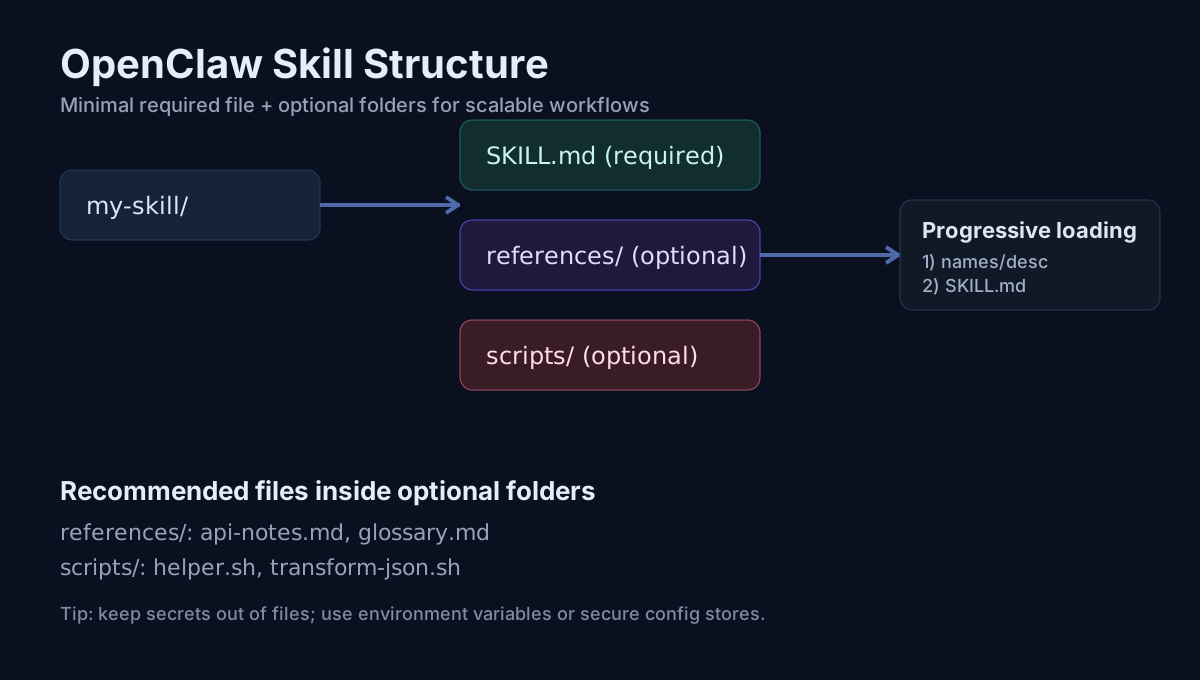
Figure: A focused skill keeps SKILL.md central and adds support files only when the workflow needs them.
Keep the directory name concrete. The current official reference requires a name slug using lowercase letters, digits, and hyphens, and recommends keeping the directory name aligned with that frontmatter name.
3. Write SKILL.md for discovery and execution
The current official SKILL.md reference lists these required frontmatter fields:
| Field | Purpose |
|---|---|
name | Unique skill slug |
description | One-line description used for discovery |
That means your description is not decorative copy. It should distinguish the task from nearby workflows.
Weak vs useful descriptions
Too broad:
description: Helps with project work.
More specific:
description: Create a concise weekly project status from updates, blockers, and next steps.
The second version makes the intended trigger and output easier to inspect.
Write the body like a testable workflow
A practical body usually needs only what the agent must follow:
- required inputs
- ordered steps
- decision rules
- failure handling
- safety boundaries
Avoid adding instructions merely to make the file longer. If a rule cannot change execution or help diagnose failure, question whether it belongs in the skill.
4. Add support files only when they help
Use support files to separate durable reference material or repeatable implementation details from the main workflow.
references/ can hold items such as:
- field definitions
- organization-specific terminology
- stable decision rules
- API parameter notes
scripts/ can hold items such as:
- deterministic transforms
- repetitive command wrappers
- input normalization
Do not hardcode tokens or private credentials into examples. A support file does not make a secret safe simply because it is outside SKILL.md.
When a script is required, make that dependency explicit and test the script separately from the model-facing workflow.
5. Verify loading before debugging behavior
Separate discovery from execution. Otherwise you can waste time rewriting instructions for a skill OpenClaw never loaded.
Check 1: discovery
Run:
openclaw skills list
Confirm the expected skill appears. If it does not, inspect the path, SKILL.md filename, and frontmatter before debugging output quality.
Check 2: happy-path behavior
Use one realistic request with all required inputs present.
Record:
- exact input
- expected behavior
- actual behavior
- unexpected tool calls or omissions
Check 3: missing-input behavior
Remove one required input. The workflow should make the missing fact visible rather than silently invent it.
Check 4: boundary behavior
Test one request that should be rejected, constrained, or handled cautiously by your guardrails.
Use a test matrix as a worksheet, not as a fabricated proof table:
| Scenario | Input to run | Expected behavior | Evidence to record |
|---|---|---|---|
| Happy path | All required fields present | Intended output structure | Actual response and tool activity |
| Missing input | Omit one required field | Missing fact is surfaced | Exact warning or follow-up behavior |
| Guardrail boundary | Request an unsafe or unsupported action | Action is constrained or refused | Actual boundary behavior |
| Dependency failure | Remove a required dependency in a safe test environment | Failure is explicit | Error text and recovery path |
Only mark a row passed after you actually run it in your environment.
6. Troubleshoot the smallest failing layer
Skill does not appear in the list
Check, in order:
- Is the skill under the expected skills root?
- Is the file named exactly
SKILL.md? - Does the frontmatter include the required fields?
- Does the
namefollow the current slug rules?
For a deeper trigger-specific checklist, use Skill Installed but Not Triggered: Fix Checklist.
Skill appears but does not match the intended request
Inspect the description first. Compare its wording with the real request that should activate the workflow. Do not solve a discovery problem by adding unrelated body sections.
Skill runs but output is inconsistent
Reduce the test to the smallest failing case:
- Keep one exact input fixed.
- Identify the first workflow step whose observed result differs from expectation.
- Remove optional steps temporarily.
- Change one instruction at a time.
- Re-run the same input and record the result.
For broader failure patterns, see OpenClaw Skill Troubleshooting: 15 Common Errors.
Skill works locally but fails elsewhere
Compare the real environments rather than assuming compatibility:
- available binaries
- environment variables
- file paths
- tool permissions
- network access
This is an environment-difference problem until evidence shows otherwise.
7. Keep permissions and secrets out of the example
A SKILL.md file can describe a workflow, but it does not grant missing runtime permissions. Do not claim a skill "works everywhere" merely because its Markdown is valid.
Before sharing a skill that uses scripts, external APIs, or write actions:
- identify what the workflow can read
- identify what it can change
- keep credentials out of committed skill files
- make destructive actions explicit
- test failure behavior with the smallest necessary permissions
Use the OpenClaw Skill Security Checklist before installing or distributing a permission-sensitive workflow.
Final build checklist
- One narrow, observable outcome
- Skill directory under the intended skills root
-
SKILL.mdpresent - Required
nameanddescriptionfrontmatter - Concrete description that distinguishes the workflow
- Ordered steps and missing-data behavior
-
openclaw skills listconfirms discovery - At least one realistic request tested
- Actual result recorded before marking the test passed
- Permission and secret boundaries reviewed
Next steps
- Need setup help first? Read How to Install OpenClaw Skills.
- Need architecture context? Read What Is an OpenClaw Skill?.
- Skill is present but not activating? Use the trigger troubleshooting checklist.
- Preparing a shared workflow? Review the security checklist.
References
FAQ
What is the minimum required file for a custom OpenClaw skill?
Create a skill directory with a SKILL.md file. The current OpenClaw creating-skills reference lists name and description as required frontmatter fields.
Where should I put a custom OpenClaw skill?
For a workspace skill, the current OpenClaw creating-skills guide uses ~/.openclaw/workspace/skills/<skill-name> as the directory pattern.
How do I verify that OpenClaw loaded my skill?
Run openclaw skills list and check that your skill appears. If you are testing in an existing session, refresh the session state before assuming the skill failed to load.
How do I test a new OpenClaw skill?
Use a realistic request with openclaw agent --message "..." or invoke the skill explicitly in chat, then compare the actual behavior with the workflow and guardrails you wrote.
Sponsored
Written by OpenClaw Community Editorial Team. Last reviewed on . Standards: Editorial Policy and Corrections Policy.